
Almost every project we build ends up with work that should not happen inside a request. Sending the email after the signup, generating the PDF, syncing the CRM every night, retrying the webhook that failed at 3 a.m. The queue that runs this work was never the hard part for us. Getting each new project onto it was.
From Redis queues and CronJobs to one Hatchet
For a long time, background work looked different in every repository. NestJS services pushed jobs into BullMQ on Redis. Scheduled work ran as Kubernetes CronJobs. Both work, and both have a ceiling we kept hitting.
BullMQ is a good queue, but it is mostly a queue. Run history lasts as long as the retention you configure, there is no built-in place to look at it, and parent and child jobs only go so far. A workflow that sleeps for two days or waits on an external event still has to be built by hand in application code. CronJobs are the opposite: easy to schedule, hard to observe. Retries, alerting and “did last night’s run actually do anything” all had to be added from outside.
Hatchet closed most of that gap for us. It is an MIT-licensed engine for background tasks and durable workflows. It keeps its state in Postgres, which we already operate, rather than adding a new kind of datastore. It covers retries with backoff, cron and scheduled runs, DAGs, durable sleeps and event waits, concurrency limits and rate limits, and every run stays visible in its UI. It is self-hostable, and it is multi-tenant: one installation can serve many isolated tenants, each with its own workflows, runs and API tokens.
| BullMQ | Kubernetes CronJobs | Hatchet | |
|---|---|---|---|
| Backing store | Redis | None, the cluster schedules pods | Postgres |
| Run history | Configured retention, no built-in UI | Pod logs while they last | Every run, in the UI |
| Multi-step workflows | Parent and child jobs | Not built in | DAGs, durable sleeps and event waits |
| Scheduling | Repeatable jobs | Cron | Cron, scheduled runs, events |
| Isolation between projects | Separate Redis or key prefixes | Namespaces | Tenants |
So we run one self-hosted Hatchet on our cluster, operated by the platform side, and every project gets its own tenant on it. On the worker side, nestjs-hatchet wires the Hatchet SDK into a NestJS application, so a worker mostly needs a token and an address.
That token is where the friction was.
The part that stayed manual
Our projects each live in their own Kubernetes namespace and are deployed by ArgoCD from Git. Everything a project needs is described there: the Deployment, the database, the ingress, the secrets it is allowed to read. Everything except its Hatchet tenant.
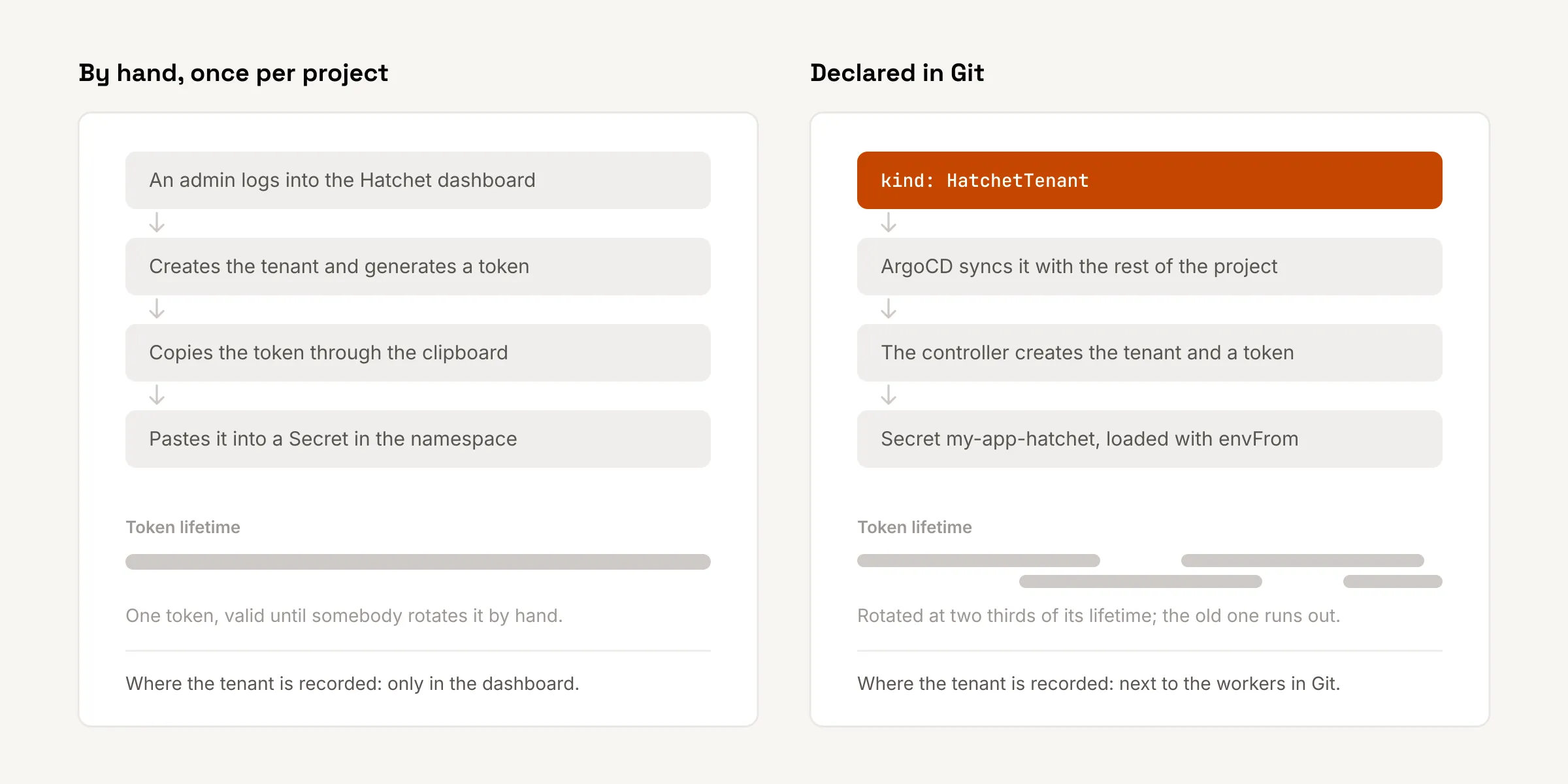
Onboarding a project onto Hatchet went like this. Someone with admin access logged into the Hatchet dashboard, created a tenant, opened its settings, generated an API token, and copied it into a Secret for the new namespace. Then nobody touched it again.
That has the usual problems of anything done by hand once:
- Nothing in Git said that a project had a tenant, which tenant it was, or who created it. The dashboard was the only record.
- The token was copied by a person, through a clipboard, into whatever secret store the project used.
- The token never rotated. Rotating it meant repeating the dashboard steps and coordinating a redeploy, so it did not happen.
- When a project was retired, its token stayed valid, because nothing tied the token’s life to the project’s.
None of this is a flaw in Hatchet. Its dashboard and CLI are the right tools for a person setting up a tenant. They are the wrong tools for a platform where every other dependency of a project arrives through a GitOps sync.
A tenant is a Kubernetes resource
hatchet-controller moves the tenant into Git. It adds two custom resources and a controller that reconciles them against the Hatchet API.
Kubernetes controller that provisions Hatchet tenants and worker credentials across namespaces, GitOps native.
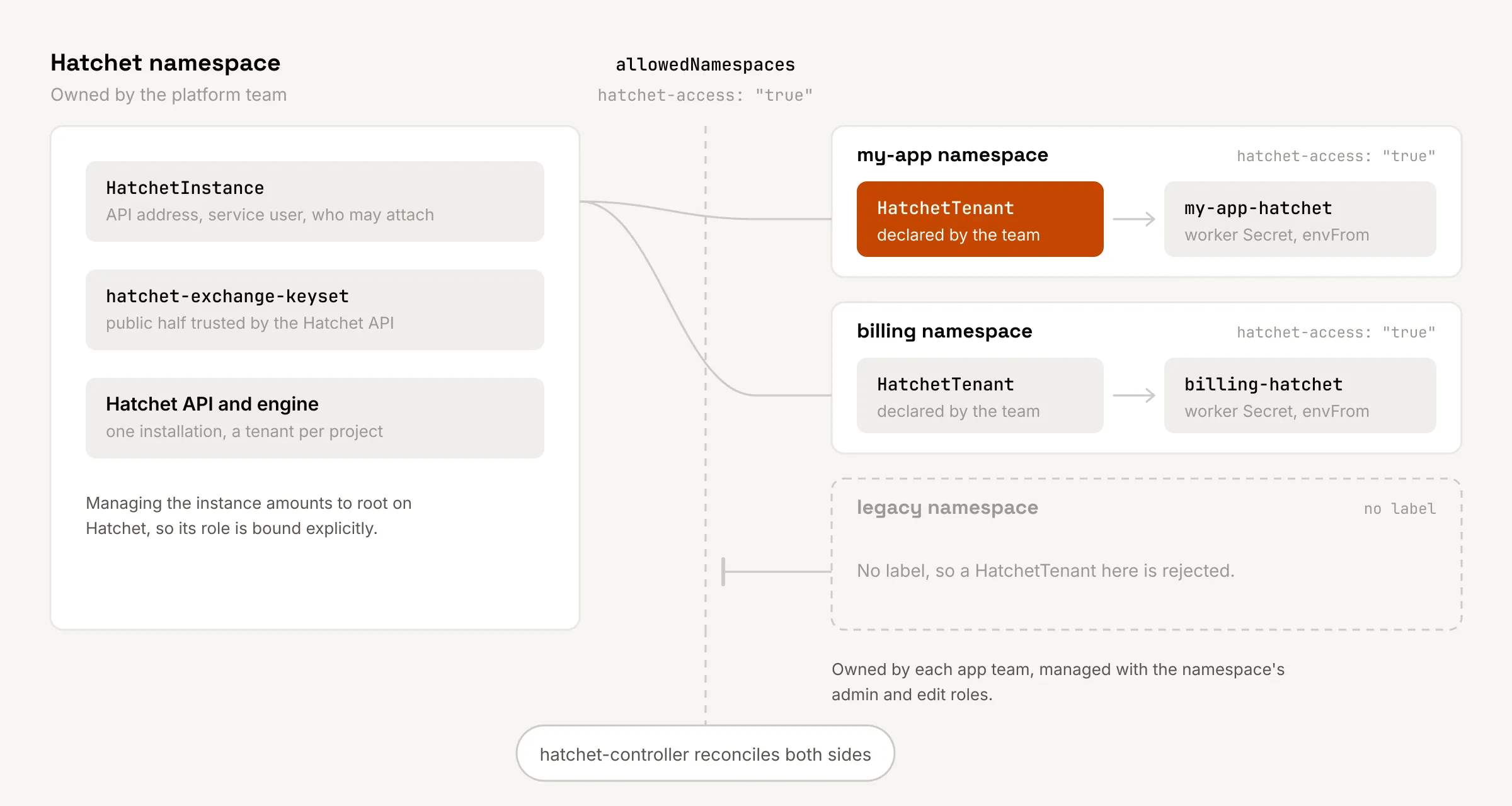
The first resource, HatchetInstance, lives in the Hatchet namespace and belongs to the platform team. It says where the Hatchet API is, which Hatchet user the controller acts as, where workers should connect, and which namespaces may attach to it:
apiVersion: hatchet-controller.abigroup.io/v1alpha1kind: HatchetInstancemetadata: name: hatchet namespace: hatchetspec: apiURL: http://hatchet-api.hatchet.svc:8080 serviceUserID: <user uuid> worker: hostPort: hatchet-engine.hatchet.svc:7070 tlsStrategy: none allowedNamespaces: from: Selector selector: matchLabels: hatchet-access: "true"The second, HatchetTenant, lives in the project’s own namespace and belongs to the team that owns the project. At its smallest it is four lines of spec:
apiVersion: hatchet-controller.abigroup.io/v1alpha1kind: HatchetTenantmetadata: name: my-app namespace: my-appspec: instanceRef: name: hatchet namespace: hatchetWhen the controller sees it, it creates the tenant in Hatchet, named my-app/my-app unless displayName says otherwise. It then mints an API token and writes a Secret called my-app-hatchet into the same namespace. That Secret holds the HATCHET_CLIENT_* variables the Hatchet SDKs read: the token, the tenant ID, the engine address, the server URL and the TLS settings. The worker loads it like any other Secret:
containers: - name: worker envFrom: - secretRef: name: my-app-hatchetThe tenant ID is also written back as an annotation on the HatchetTenant. If the resource is ever deleted and restored from a backup, it binds to the same tenant in Hatchet instead of creating a new, empty one.
The HatchetTenant is just another file in the project’s directory, so it ships in the same ArgoCD sync as the worker that needs it. A new project no longer needs an admin, a dashboard session or a clipboard. It needs one more manifest in the pull request that creates it.
Who owns what
The two resources exist because the platform team and the project teams want different things from Hatchet. Each resource carries one side.
The platform team owns the HatchetInstance. It decides where Hatchet runs and, through allowedNamespaces, which namespaces may use it at all. The default is Same, meaning only the instance’s own namespace. In practice we use a label selector, so a namespace gains access to Hatchet by carrying a label the platform team controls, not by asking someone to click.
Project teams own their HatchetTenant. They can create, change and delete it without anyone from the platform side involved, and they never see a credential that reaches beyond their own tenant.
RBAC follows the same split. The role for managing HatchetTenant resources is aggregated into the standard Kubernetes admin and edit roles, so anyone who can deploy into a namespace can manage its tenant. The role for managing HatchetInstance resources is deliberately not aggregated anywhere. Controlling an instance amounts to root access on that Hatchet installation, so it has to be bound explicitly, per Hatchet namespace, to the people who should have it.
Tokens that rotate themselves
Every HatchetTenant has a tokenTTL, one year by default and anywhere from a day to a year if set. At two thirds of that lifetime, the controller mints a fresh token and writes it into the Secret. The old token stays valid until its own expiry, so running workers keep working on the token they started with, and the last third of the lifetime is the window for them to restart and pick up the new one. With a short TTL, a restarter such as Reloader makes that automatic.
Replacing a token on purpose is a single command. If a token has leaked, delete the worker Secret. The controller mints a new token, revokes every other token it issued for that tenant, and writes the Secret again. Deleting the HatchetTenant itself revokes its tokens and removes the Secret, so a retired project no longer leaves a working credential behind.
The controller itself holds no long-lived admin credential for Hatchet. It generates a signing key per HatchetInstance, publishes the public half as a Secret that the Hatchet API trusts at startup, and signs its own exchange tokens for each call. Those expire after five minutes. The private key is the sensitive part, so it stays in the Hatchet namespace, where Secret access should be restricted and etcd encryption turned on.
What it does not do
The controller manages tenants on a Hatchet you already run. It does not install, upgrade or operate Hatchet itself; for that, Hatchet’s own Helm charts are the place to start.
It also cannot delete a tenant. Deleting a HatchetTenant revokes the tokens and removes the Secret, but the tenant stays in Hatchet, because Hatchet has no API to delete one. Its workflows and run history remain visible to whoever still has access.
And the API is v1alpha1, so it can still change between releases. The changelog is the place to watch.
Where this fits
This is the same move we keep making across a fleet of repositories run by one small team: take a step that a person performs by hand once per project, and make it something the project declares in Git. The tenant now sits in the same pull request and the same ArgoCD sync as the worker that uses it, and it reaches Hatchet through a short-lived signed token instead of a credential someone copied. Hatchet tenants were the last piece of a project’s setup that still needed someone to log into a dashboard.